Nodes and networks
How fields, materials, placements and networks work together to make a world.
Follow a world from its terrain fields to its materials and placed structures, then use networks when several places need to stay linked. Start with a small working graph and inspect each change in the preview before adding another part.
Fields, materials and placements
A density field gives a number at each position. Positive values make solid terrain; zero and negative values leave air. Octave Simplex 2D can supply rolling variation, and Scale Density sets how strongly that variation affects the ground.
Try Cellular Noise for cell borders like cracked mud. Choose Edge ratio in Output to highlight the edges. Its output is a Density field.
Materials decide which blocks appear. Material by Solidity separates ground from empty space, while Depth Layers paints near the surface. Biome Definition combines the terrain and its materials with a Minecraft biome. Grid Template Placement adds structures to the world.
Follow the wires into World Output to see how these parts come together. Change one value, inspect its preview, then look at the terrain. Studio basics covers preview controls and Undo.
Reuse part of a graph with a group
A group packages connected nodes behind its own inputs and outputs. Use one when you want to reuse a terrain recipe or keep a large graph easier to read.
Double-click a group instance to edit its shared definition, then use the breadcrumb to return to the world graph. Changes to that definition affect every instance, so expose the settings you want to vary as group inputs.
Build a network of places and links
A network holds points and links between them. Points can mark places that need to share a layout; links describe how those places relate. Both can carry named numbers, tags and content.
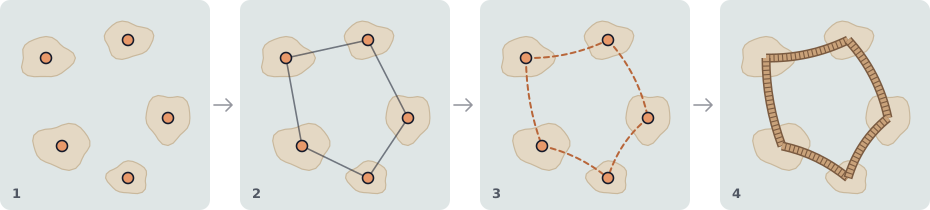
From left: a point on each island, links from Connect, curved paths from Path, and a deck from Sweep that only spans the water.
Create the points with Lattice Points, Mesh Points or Explicit Points. Feed the network through Pass to change it. A pass runs its actions in order and can repeat the list.
Each action uses a selector to choose the points or links it affects. Connect adds links, Spawn creates points, and Move changes their positions. Other actions can set values, tags or content, copy them to neighbours, or delete selected elements.
An action reads the network as it was when that action began, then applies its changes together. For a chain A–B–C, deleting points with one neighbour removes A and C while B stays. The next action sees that result.

Turn a network into terrain
Readers make the network visible:
- Point Field builds density shapes around points.
- Path Distance measures distance to a path or link, useful for shaping a road.
- Nearest Value reads a nearby point’s value, tag or distance.
- Content Material and Content Placements use content carried by points.
The same network can feed several readers. Islands and their bridges can therefore share one layout, keeping the related shapes together when you move an island.
Follow paths with placed structures
Path turns links into paths with the shape you choose. Path Samples creates points along them, and Point Instances places templates or formations at points.
For structures that meet terrain, Surface Contacts finds landings within a bounded vertical window. Path Clearance checks the path against the base terrain. Sweep places a material profile along an accepted path, such as a bridge deck. Paths rejected by the contact or clearance checks produce no swept structure.
Keep the first network small enough to inspect. Search distances and repeated actions increase the area and work needed to build it. Networks work within local bounds; they do not find a globally shortest route or a spanning tree.